
OM CRM & projects · v1.0
OM
CRM, projects and a client portal for one company, on your own server.
- Any PHP 8.2 host
- MySQL or MariaDB
- Own domain
Pricing announced at launch
ZT Productivity · Windows desktop · v1.0 Available now
A daily planner that runs on your own computer.
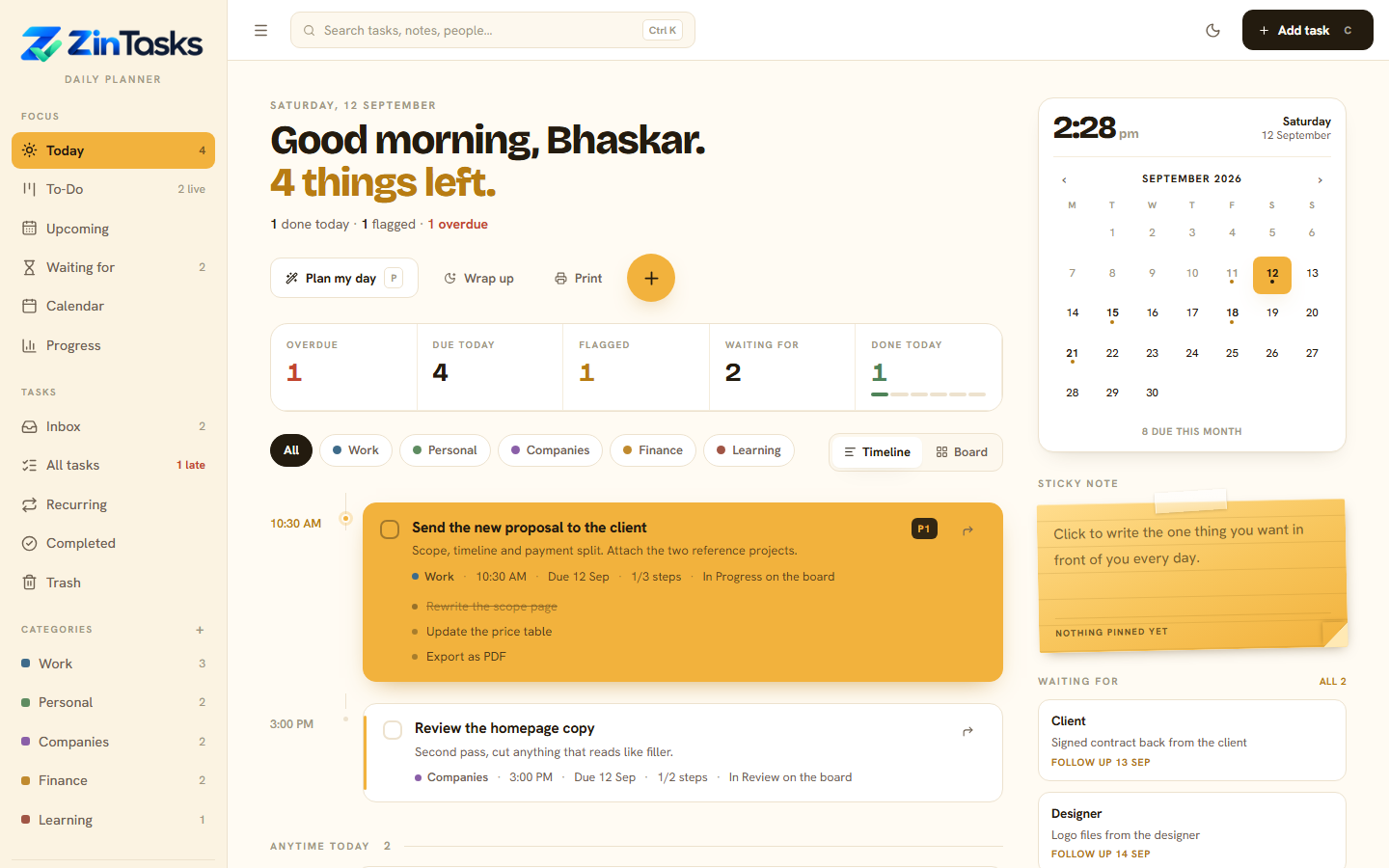
Zin Tasks is a full planner you run from a folder. No account, no sign-up, no cloud, no subscription. Unzip it, double-click Start, and your browser opens on today's plan. Everything you type stays in one file on your machine.
Today shows a timeline of timed work, an anytime list, what you finished and who you are waiting on. Press P to plan, C to capture, / to search.
Todo, In Progress, In Review, Done. Drag cards across, tick subtasks, watch the progress bar move.
Set how many minutes of warning you want and timed tasks nudge you through normal Windows notifications.
Undo bar on every delete, a 30-day trash with restore, and "Empty trash" asks you to type it out first.
Streaks, best run, twelve weeks of history and which areas the work came from. Print a day sheet if you plan on paper.
One SQLite file holds everything. Back it up by copying it. Import from CSV, install it as an app from the browser.
| Today | The day in front of you: timeline, anytime list, done, waiting. |
|---|---|
| To-Do | Drag-and-drop board with progress, tags and subtasks. |
| Upcoming | The next stretch, grouped by day. |
| Waiting for | Anything parked with someone else, with a follow-up date. |
| Calendar | A month view of everything dated. |
| Progress | Streaks, the last twelve weeks, a five-week heat strip. |
| Inbox | Quick capture. Sort it later. |
| All tasks | Every task, with filters and search. |
| Recurring | Tasks that come back daily, weekly or monthly. |
| Completed | The log of what is done. |
| Trash | 30 days of deleted tasks, ready to restore. |
| Settings | Name, accent colour, areas, password, reminders, import, backups. |
All updates and how to install one
No. A PHP runtime ships inside the folder. Unzip and double-click Start.bat.
One licence activates one computer. Buy a second licence for a second machine, or email us to move the activation.
In database/database.sqlite inside the folder. Copy that file and you have a full backup.